Are Bluetooth Golf Cart Batteries Worth the Upgrade?
Reading time: 15 minutes

Share
A Bluetooth golf cart battery can be a worthwhile upgrade for Canadian owners who want a clearer picture of their battery’s condition, especially when the cart is used for longer trips around a cottage property, campground, resort, private community, farm, or large commercial site.
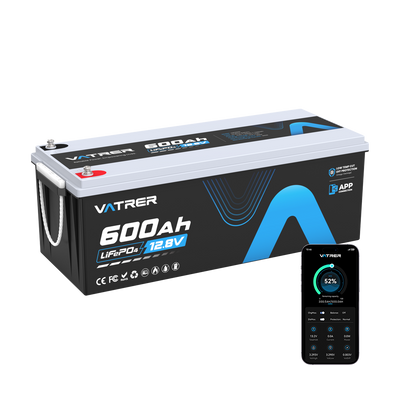
Through a phone app, you can usually check state of charge, battery temperature, charging current, cell voltage, and active battery management system warnings. That information can be much more useful than the basic battery bars found on many golf cart dashboards.
However, Bluetooth does not increase range, improve hill-climbing power, or make the battery charge faster. It is a monitoring feature. Whether it is worth paying extra for depends on how often you will use the data and whether the battery already meets your cart’s electrical requirements.
How Bluetooth Monitoring Works in a Golf Cart Battery
A Bluetooth-enabled golf cart battery contains a wireless communication module connected to the battery management system, commonly called the BMS. The BMS continuously monitors the lithium cells, manages charging and discharging, and activates protective functions when operating limits are exceeded.
The Bluetooth module sends selected BMS information to an app installed on a compatible smartphone or tablet. Depending on the battery model and software, the app may display:
- State of charge as a percentage
- Total battery voltage
- Charging and discharging current
- Estimated remaining amp-hours
- Battery and BMS temperature
- Individual cell voltages
- Charge cycle count
- Active fault or protection messages
- Charging and discharge status
The phone is not responsible for protecting the battery. Even when the app is closed or the Bluetooth connection is lost, the BMS should continue controlling overcharge, over-discharge, overcurrent, short-circuit, and temperature protection.
The app is simply a window into what the BMS is already measuring. A reliable battery should continue operating safely without a phone, mobile signal, Wi-Fi connection, or active Bluetooth pairing.
Features vary significantly between apps. One golf cart battery Bluetooth app may show only charge percentage, voltage, current, and temperature, while another may include cell-level readings, fault history, device naming, and limited BMS controls.
It is also important to separate the benefits of Bluetooth from the benefits of switching to lithium. Bluetooth itself does not directly improve:
- Usable battery capacity
- Continuous discharge current
- Motor output
- Acceleration
- Performance on hills
- Charging speed
- Driving range
Those characteristics depend on battery chemistry, capacity, voltage, BMS current limits, motor size, controller settings, wiring, tire pressure, and overall cart weight.
For example, a traditional 48V lead-acid cart may use six 8V batteries weighing approximately 27 to 32 kg each. The complete battery bank can weigh around 163 to 191 kg. By comparison, a single 51.2V 100Ah LiFePO4 battery may weigh approximately 41 to 59 kg.
The potential weight reduction is substantial:
163 to 191 kg − 41 to 59 kg = approximately 104 to 150 kg less weight
Removing that much weight may improve acceleration, steering response, suspension load, and climbing performance. Those gains come from the golf cart lithium battery, not from its Bluetooth connection.


Main Benefits of a Bluetooth Golf Cart Battery
The main advantage of Bluetooth monitoring is visibility. Instead of guessing from a dashboard icon, you can see how the battery responds during charging, acceleration, hill climbing, cold-weather storage, and everyday driving.
More Useful State-of-Charge Information
LiFePO4 batteries maintain a relatively stable voltage through much of their discharge cycle. This is helpful for performance, but it can make a simple voltage-based battery gauge less reliable. The gauge may appear nearly full for a long time and then drop rapidly near the bottom of the charge.
A Bluetooth battery usually estimates state of charge by measuring current entering and leaving the battery. This process, often called coulomb counting, can provide a more practical percentage than a basic voltage gauge.
Consider a typical 48V lithium golf cart battery rated at 51.2V and 100Ah:
51.2V × 100Ah = 5.12 kWh of nominal stored energy
If the app shows 40% state of charge, the estimated remaining energy would be:
5.12 kWh × 0.40 = approximately 2.05 kWh
That figure cannot be converted into one guaranteed driving distance. Energy use changes with passenger weight, cargo, tire condition, ambient temperature, road surface, slopes, speed, wind, controller programming, and accessory loads.
The app becomes more valuable after you build your own trip history. For example, a level route around a campground might use 15% of the battery, while a similar-distance route through a hilly cottage area might consume 25% or more.
Bluetooth data can help you:
- Check available charge before leaving on a longer route
- Compare battery use on flat and hilly terrain
- Identify an unusual increase in energy consumption
- Decide whether overnight charging is necessary
- See how colder Canadian temperatures affect usable capacity
- Estimate whether the cart can complete another normal trip
Vatrer Bluetooth monitoring is designed to make this information available without opening the battery compartment. The percentage should still be considered an estimate and used together with your normal route history.
State-of-charge estimates may gradually drift after repeated partial charging. On some batteries, completing a full charge allows the BMS to correct its estimate. Always follow the calibration instructions supplied for the specific model.
Faster BMS Troubleshooting
Several battery-related problems can feel exactly the same from the driver’s seat. The cart may slow down, stop suddenly, refuse to charge, or power off during a hill climb. Without diagnostic information, it can be difficult to tell whether the issue is low charge, excessive current, temperature protection, or a cell-voltage limit.
A Bluetooth app may display messages such as:
- Low-voltage protection: One or more cells reached the minimum permitted voltage.
- Overcurrent protection: The motor controller requested more current than the BMS allowed.
- High-temperature protection: Battery or BMS temperature exceeded the safe operating limit.
- Low-temperature charge protection: Charging was blocked near or below 0°C.
- Charge disabled: The BMS temporarily stopped incoming charging current.
- Discharge disabled: The BMS opened the discharge circuit to protect the cells.
- Cell imbalance warning: The voltage difference between cells exceeded the expected range.
This information can be especially helpful on upgraded carts. A high-performance controller may create a large current spike during hard acceleration, when carrying several passengers, or while climbing a long incline.
If an overcurrent warning appears at the exact moment the cart shuts down, the battery’s BMS rating may be too low for the controller. Bluetooth can reveal that mismatch, although it cannot correct it.
Individual cell readings are also useful when interpreted carefully. A small voltage difference during charging or under load is not automatically a sign of failure. Cell voltages change with current, temperature, state of charge, and balancing activity.
A repeated pattern is more important than one isolated reading. If the same cell consistently drops much lower than the others or repeatedly causes low-voltage protection, further testing may be necessary.
App screenshots can also improve communication with technical support. A screenshot showing total voltage, current, battery temperature, minimum cell voltage, and active fault status provides much more evidence than simply reporting that the cart stopped.
Convenient Charging and Storage Checks
Bluetooth allows you to check the battery without lifting the seat, removing a compartment cover, or connecting a separate meter. This can be particularly convenient when the cart is stored in a garage, barn, seasonal property, or covered winter storage area.
You can use the app to:
- Confirm that charging current begins after the charger is connected
- Check whether the battery has completed charging
- Monitor temperature after a demanding drive
- Review cell voltages near full charge
- Check the charge level before seasonal storage
- Inspect several carts without opening every battery compartment
For commercial properties or resorts with multiple carts, the usefulness depends heavily on app design. Device naming, saved battery profiles, quick switching, and automatic reconnection can make monitoring efficient. An app with poor device management may require repeated scanning and manual identification.
Potential Drawbacks of Bluetooth Batteries
A battery may continue working normally even when its Bluetooth feature does not. Adding wireless monitoring introduces another system that depends on phone permissions, app compatibility, software maintenance, and manufacturer support.
Connection and App Reliability
Common Bluetooth problems include:
- The battery does not appear in the device list.
- The battery must be awakened by charging or applying a load.
- The app disconnects when the phone screen locks.
- The app does not reconnect automatically.
- The Android and iOS versions offer different features.
- Bluetooth scanning requires location or nearby-device permission.
- A phone operating-system update creates compatibility problems.
- The app is removed or no longer updated by the manufacturer.
Wireless range is usually limited. Under favourable outdoor conditions, the phone may connect from approximately 3 to 9 metres away. The cart’s metal frame, battery enclosure, seat base, wiring, and nearby electronic components can reduce that distance.
Basic battery monitoring should normally work without mobile data or Wi-Fi. The battery should also continue charging, discharging, and activating BMS protection without an internet connection.
Before buying, review the current app listing rather than relying only on product-page screenshots. Check the latest update date, supported phone operating systems, recent user feedback, and available troubleshooting instructions.
Battery Data Is Not Always Exact
The app displays sensor readings and BMS estimates. These values are useful for identifying trends, but they should not always be treated as laboratory-grade measurements.
State of charge can drift over time because coulomb counting depends on accurate current measurement and correctly configured battery capacity. Small errors may accumulate after many partial charge and discharge cycles.
Possible causes of an inaccurate percentage include:
- Repeated incomplete charging
- Incorrect capacity settings
- Current-sensor calibration differences
- Small accessory or standby loads
- Firmware configuration
- Cell balancing near the top of charge
- Capacity loss as the battery ages
The temperature and voltage displayed in the app may also differ slightly from separate test equipment. Small variations are normal because sensors have measurement tolerances and may be positioned in different parts of the battery.
Watch for patterns rather than reacting to one number. A charge percentage that repeatedly drops from 30% to 5%, a shutdown that consistently occurs at the same indicated charge, or one cell that regularly falls behind the others is more meaningful than a single irregular reading.
The Extra Cost May Be Better Spent Elsewhere
Bluetooth should never take priority over the specifications that determine whether the battery can safely operate the cart.
If two batteries have similar capacity, discharge ratings, charger requirements, warranty coverage, and physical dimensions, paying a modest premium for Bluetooth may be reasonable. A price increase of around 5% is usually easier to justify than paying 10% to 15% more.
A larger premium becomes difficult to support when the same budget could purchase:
- More usable energy capacity
- A higher continuous-current rating
- A stronger peak-current capability
- Better cold-weather protection
- A compatible charger
- Longer or clearer warranty coverage
- More accessible Canadian service support
A properly sized non-Bluetooth battery is a better purchase than a Bluetooth model with insufficient current capability.
Security should also be considered. Check whether the app requires a password, whether nearby users can connect without authorization, and whether the app allows important BMS settings to be changed. Most owners need read-only monitoring rather than unrestricted access to battery parameters.
Bluetooth and an always-active BMS may also consume a small amount of standby power. During long winter storage, follow the manufacturer’s recommended shutdown, charging, and storage procedure. A physical power switch or sleep mode may reduce unnecessary discharge.
Bluetooth App vs. Dashboard LCD Monitor
A phone app and a wired LCD display serve different purposes. The app usually provides deeper diagnostic information, while a dashboard display is easier to read during normal driving.
Bluetooth App and LCD Monitor Comparison
| Feature | Bluetooth app | LCD battery monitor |
|---|---|---|
| State-of-charge percentage | Usually available | Usually available |
| Total battery voltage | Usually available | Often available |
| Charging and discharge current | Commonly displayed | Depends on the monitor |
| Individual cell voltages | Available in some apps | Rarely displayed |
| BMS protection warnings | Often available | Usually limited |
| Battery temperature | Commonly displayed | Not always included |
| Phone required | Yes | No |
| Easy to view while driving | No | Yes |
| Connection concerns | May be affected by app or pairing issues | Generally stable when wired correctly |
| Installation | Usually built into the battery | May require wiring and dashboard mounting |
| Historical records | Available in some apps | Rarely available |
| Monitoring multiple carts | Possible with certain apps | Normally limited to one battery |
An LCD display is often enough when the main goal is to see the remaining charge while driving. Bluetooth provides more value when you want to inspect current draw, temperature, cell voltage, or BMS fault information.
Some owners use both. The LCD provides an immediate dashboard reading, while the app is opened when more detailed information is required. Paying for both makes sense only when the readings are accurate and each device serves a clear purpose.
When Is Bluetooth Worth Paying For?
The answer depends on how the golf cart is driven, where it is used, and how involved you are in maintenance and troubleshooting.
Bluetooth Is Often Worth It When
- Your regular trips use a significant portion of the battery.
- The cart travels a long distance from its charger.
- You drive around a large cottage property, resort, campground, farm, or private community.
- You complete your own lithium conversion.
- The cart has an upgraded motor or controller.
- You want to see BMS protection messages.
- You need access to individual cell readings.
- You manage several golf carts.
- The Bluetooth price premium is small.
- Technical support can use app screenshots for diagnosis.
Modified golf carts require special attention. A controller capable of drawing 400A can exceed the limits of a battery rated for 200A continuous discharge, even though both products are advertised for 48V systems.
Bluetooth may show the current spike or overcurrent event, but it cannot prevent a poorly matched battery from interrupting power. Correct battery sizing remains essential.
Bluetooth May Not Be Necessary When
- Your trips are short and predictable.
- The cart returns to a charger after every use.
- A reliable LCD monitor already shows the information you need.
- You have no interest in cell-level data.
- You prefer equipment that does not depend on a phone.
- The Bluetooth version is considerably more expensive.
- A non-Bluetooth battery offers better capacity or current performance for the same price.
A non-Bluetooth lithium battery can still be a safe and dependable choice. It should include a properly designed BMS with overcharge, over-discharge, overcurrent, short-circuit, and temperature protection.
What to Check Before Buying a Bluetooth Battery
Begin with the cart’s electrical requirements. Bluetooth should only influence the final decision after the battery has been confirmed compatible with the controller, charger, wiring, contactor, accessories, and available installation space.
Prioritize Battery Specifications
Many lithium conversions for 48V golf carts use a 51.2V nominal LiFePO4 battery made with 16 cells connected in series. That does not automatically make every 51.2V battery suitable for every cart.
Battery Specifications That Matter More Than Bluetooth
| Specification | Typical reference | Why it matters |
|---|---|---|
| Nominal voltage | 51.2V is common for a 48V lithium conversion | Must be compatible with the controller and electrical system |
| Full-charge voltage | Approximately 58.4V for a 16-cell LiFePO4 battery | The charger must follow the battery manufacturer’s requirements |
| Capacity | 100Ah at 51.2V provides 5.12 kWh | Determines how much energy the battery stores |
| Continuous current | 200A at 51.2V represents about 10.2 kW of electrical input | Must support sustained motor demand |
| Peak current | Should include a clearly stated time limit | Supports acceleration and short, demanding climbs |
| Low-temperature charging protection | Often activates near 0°C | Helps prevent charging damage in cold conditions |
| Battery weight | Approximately 41 to 59 kg for many 100Ah-class batteries | Affects handling, tray load, and installation |
| Physical dimensions | Measure the tray, hold-down points, terminals, and cable clearance | Reduces the risk of installation conflicts |
| Warranty | Review coverage, exclusions, shipping, and claim requirements | The advertised term may not represent complete coverage |
A battery may have enough energy capacity for a full day of normal use but still be unable to supply the current required by an upgraded controller. Capacity determines how long the battery can operate. Current capability determines how much electrical demand it can support at one time.
For example:
51.2V × 200A = approximately 10.24 kW
This represents approximate electrical power at the battery under a 200A load. It is not the same as mechanical motor output because energy is lost through the controller, motor, wiring, differential, and drivetrain.
If the controller can request 400A, check both the battery’s peak-current rating and the maximum permitted duration. A battery may support 400A for only a few seconds, which could be adequate for brief acceleration but insufficient for a long climb with passengers.
Review the App Before Ordering
The phrase “Bluetooth enabled” does not explain what information is actually available. Ask for current app screenshots, a user guide, or a feature list before making a decision.
Confirm that:
- The app supports your current Android or iOS version.
- Essential monitoring works without Wi-Fi or mobile data.
- State of charge, voltage, current, and temperature are visible.
- Individual cell voltages are available when detailed diagnosis is required.
- Fault messages are written in understandable language.
- Multiple batteries can be renamed and organized.
- Pairing includes a password or another access-control method.
- Important BMS settings cannot be changed accidentally.
- Connection, reset, and troubleshooting instructions are available.
A useful app does not need dozens of complicated screens. The most important information should be easy to locate within a few taps.
Evaluate Warranty and Canadian Support
Bluetooth information is most valuable when the manufacturer or dealer knows how to interpret it. Before purchasing, review:
- Warranty coverage: Check capacity thresholds, exclusions, labour, shipping responsibility, and transfer conditions.
- App support: Look for current download links, setup instructions, and troubleshooting information.
- Diagnostic assistance: Confirm that support can review current, voltage, temperature, and cell screenshots.
- Replacement logistics: Ask where replacement batteries ship from and who pays freight during a valid claim.
- Cold-weather guidance: Verify the recommended charging and storage procedure for Canadian winters.
Conclusion
A Bluetooth golf cart battery is worth considering when you regularly use detailed battery information. It can help with route planning, charging checks, BMS troubleshooting, cold-weather monitoring, and maintenance across multiple carts.
It should not be the first feature you compare. Confirm voltage compatibility, usable capacity, continuous-current capability, peak-current duration, low-temperature charging protection, charger requirements, physical fit, and warranty coverage before considering the app.
A modest price increase may be worthwhile when Bluetooth provides dependable SOC tracking, fault alerts, current readings, and cell-level information. A large premium is harder to justify when the same money could purchase more capacity or stronger discharge performance.
Choose Bluetooth for better information. Choose the battery’s electrical specifications based on how the golf cart actually needs to perform.
Share